

Connect your agent
Point LiveKit and your agent at VoiceGateway.
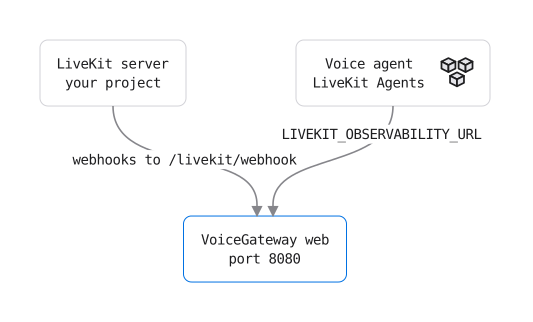
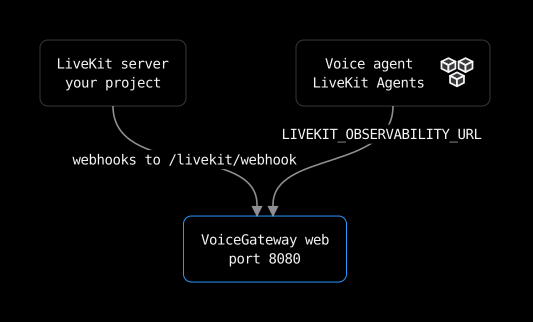
One VoiceGateway project is one LiveKit project. Self-hosted and Cloud follow the same steps; only the host in the URLs differs.
Add the project
Self-hosted:
export LIVEKIT_URL=wss://your-project.livekit.cloud
export LIVEKIT_API_KEY=...
export LIVEKIT_API_SECRET=...
make project-add NAME="Production"
Cloud: in the console, choose Add a LiveKit project in the organisation switcher (top left) or in Settings > Organisation, and enter the same three values.
The secret is stored encrypted and never shown again. To change the key and secret later, an Admin opens Settings > Connection; the URL stays, since another LiveKit project is another VoiceGateway project.
Self-hosted only: the console builds the two URLs from VOICEGATEWAY_PUBLIC_URL. Add the address LiveKit and your agent reach VoiceGateway on to deploy/.env, then run make up again:
VOICEGATEWAY_PUBLIC_URL=https://voicegateway.example.comFor an agent on the same machine, http://localhost:8080 is enough. Until it is set, the panel says the public URL is not set instead of showing the URLs. Cloud sets it for you.
Copy the two URLs
The Connect your agent panel is on the project's Overview until the first call is stored, and always in Settings > Connection. It shows both:
- Agent upload:
https://<host>/ingest/<organisation-id>/<project-id> - Webhook:
https://<host>/ingest/<organisation-id>/<project-id>/livekit/webhook
Connect the agent
In an existing agent, set one variable and turn session recording on. No VoiceGateway code.
LIVEKIT_OBSERVABILITY_URL=https://<host>/ingest/<organisation-id>/<project-id>- Python: livekit-agents 1.8.0 or later (tested on 1.8.6 to 1.8.8),
session.start(..., record=True). - Node: @livekit/agents 1.8.0 or later,
session.start({ ..., record: true }).
The agent uploads only sessions that record. To send traces, logs, metrics and the transcript without the call audio, record without it: record={"audio": False} in Python, record: { audio: false } in Node. Every version that honours LIVEKIT_OBSERVABILITY_URL accepts these options.
For custom call fields, live state, or to keep LiveKit Cloud's own observability, add the Python SDK.
No agent yet? Run the example agent. It needs a clone of this repository, uv and the LiveKit CLI (lk). Copy examples/livekit-agent/.env.example to .env, fill in the LiveKit values and the agent upload URL, then run make example-call. It starts the example agent, places one call with lk and stops. The example uses LiveKit Inference, which needs a LiveKit Cloud project.
Send LiveKit's webhooks
In LiveKit Cloud, open Settings > Webhooks, choose Create new webhook, paste the webhook URL and pick the same API key as the signing key. On a self-hosted LiveKit server, put the URL under webhook.urls in livekit.yaml and the same API key under webhook.api_key, then restart the LiveKit server:
webhook:
  api_key: <your LiveKit API key>
  urls:
    - https://<host>/ingest/<organisation-id>/<project-id>/livekit/webhook
Without it, a call closes only after 2 hours with no activity, and its end time is marked as inferred.
Watch the first call arrive
The panel moves from Waiting to First call stored. If VoiceGateway refuses a webhook or an upload, the panel shows the reason and the fix.
LiveKit Cloud needs a public HTTPS address for a self-hosted VoiceGateway. See reaching VoiceGateway from LiveKit.
Was this page helpful?